
Learn the foundations.
Explore sound, rhythm, keys, chords and mixing. Make a first sketch without needing to understand every production tool at once.
Why DawIt
DAW means digital audio workstation: software for recording, arranging, editing and mixing music. DawIt uses that familiar workspace to help you learn as you make your own.
Two different priorities
Full DAWs can have excellent tutorials and help too. DawIt’s defining focus is the explanation inside the music-making process.
| What you need | DawIt Learn & experiment | A full DAW Produce & finish |
|---|---|---|
| A main purpose | Understand music and sound while developing an idea. | Take a production through recording, arrangement, mixing and finishing. |
| Help with the “why” | Built-in theory guides, playable examples and pictures that respond to the song or effect. | The learning resources and help vary with the DAW you choose. |
| Help in the moment | Chord functions, settings explained in numbers, live levels and suggestions about your song. | Detailed production controls, with help and analysis tools depending on the DAW. |
| Making real music | Tracks, audio and MIDI recording, a piano roll, plugins, effects, buses and sends. | A wider production workflow for developing and finishing the recording. |
| Moving an idea | Drag out MIDI, export MIDI files or bounce the mix to WAV. | Import the sketch and develop it with your usual instruments, effects and workflow. |
A comparison of purpose, rather than a claim that every DAW has the same features.
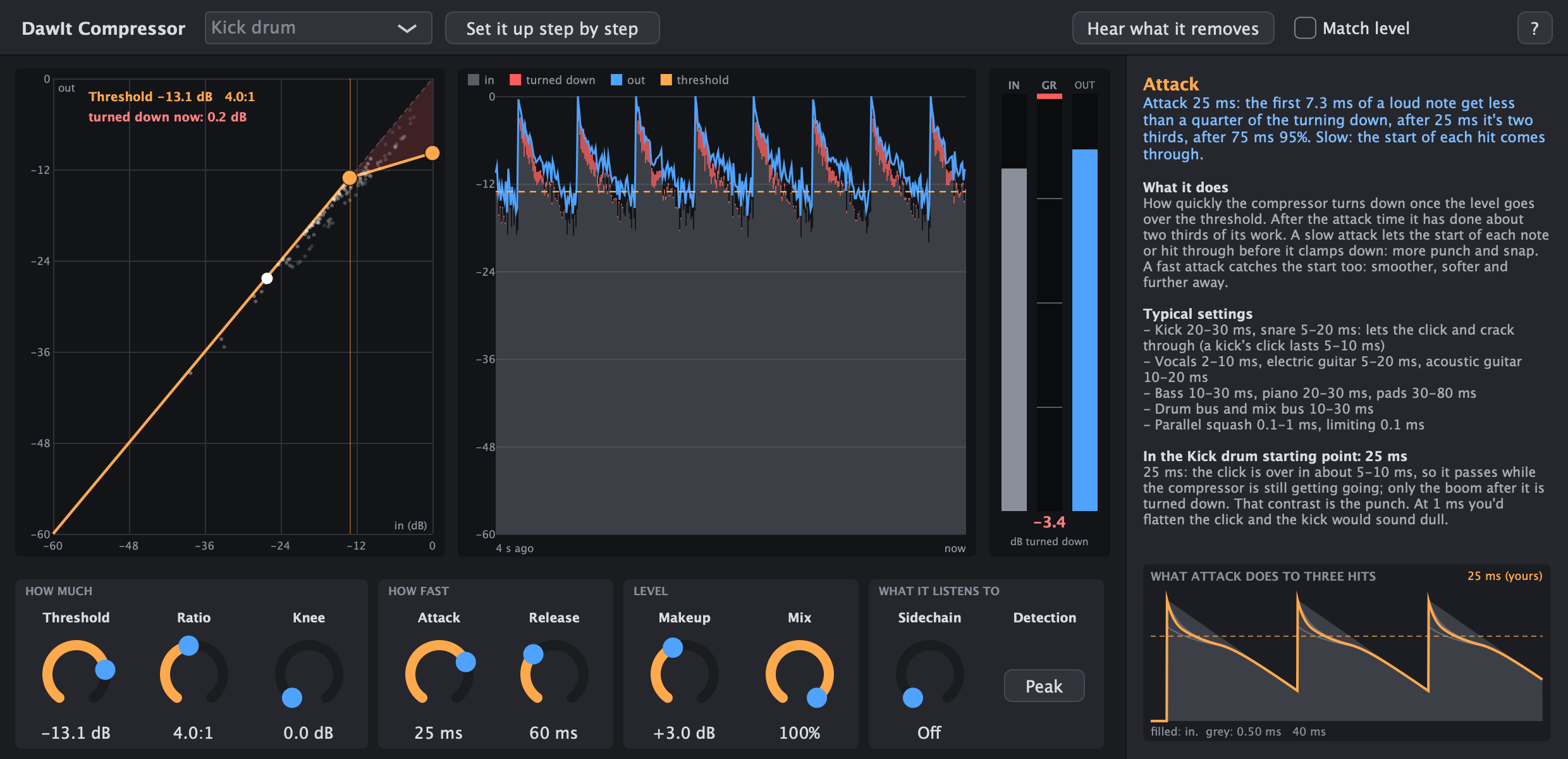
An example: the compressor
In DawIt, the compressor is also a way to learn compression. Its explanation panel follows the control under your mouse. Its display shows what it turns down while the track plays.
Use it on its own, or alongside your DAW
Explore sound, rhythm, keys, chords and mixing. Make a first sketch without needing to understand every production tool at once.
Study a recording, compare kinds of reverb or understand synthesis. Export an idea back to the DAW you already use.
Move notes as MIDI and the mix as WAV. DawIt’s own effects and synths can also be built as VST3 and Audio Unit plugins, except Tune.
DawIt is in very early access. It is a learning and sketching environment with real production tools. For a complete production workflow and a finished release, plan to use a full DAW. DawIt currently uses 4/4 time.
Your next step
No theory exam. Just a question and something to play.